

The Browser UI
rocky serve --ui serves a browser UI for one project. It shows the project’s models and runs, the plans waiting for a human, and the policy decisions and product history the engine recorded. On your own machine, the UI can also make changes (see Operator mode). Every value on the page comes from a typed /api/v1 payload. Most of those payloads are the same ones the CLI prints with --output json.
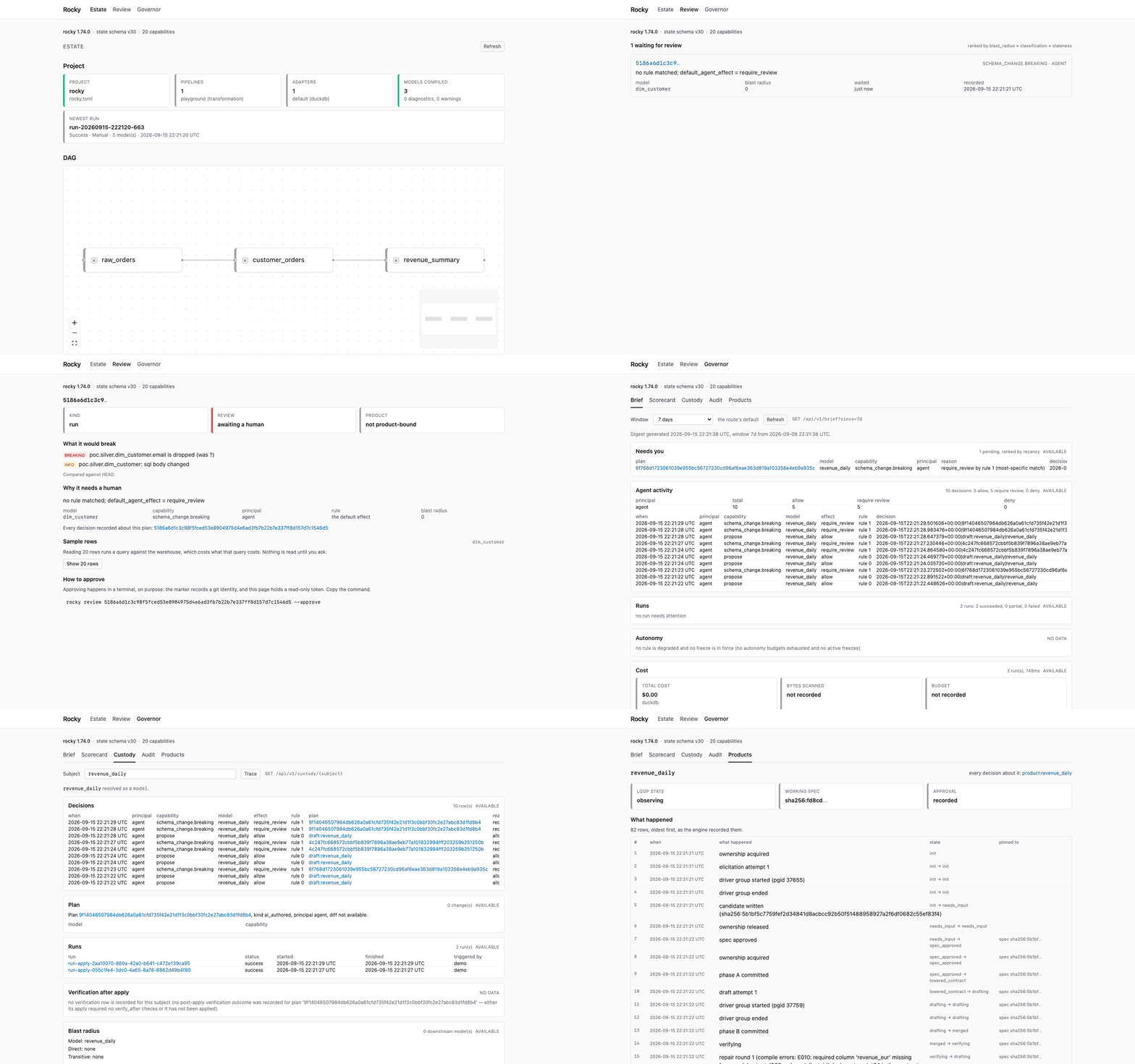
The UI ships inside the release binaries and the container image. A sidebar lists eleven areas. Five open a screen today:
Needs you what waits for you now Projects - Estate models, the DAG, runs and schedules Runs - Scheduler - Review plans that need a human, one plan in full Policies - Products each data product, and its journal Governance scorecard, custody, audit Agents & Clusters - Settings -The other six are not links. Each shows, under its name, what is true instead. They are listed in Areas without a screen. On a screen narrower than 1024 pixels the sidebar folds behind an Areas button.
Open the UI
Section titled “Open the UI”On your own machine, start the server from the project directory:
rocky serve --uiThe server prints one address:
Rocky UI: http://127.0.0.1:8080/login?t=<secret>Open that address, or add --open to open it in your default browser. The link signs you in. See Sign-in and the session cookie.
With no token configured, the server generates a per-process token. It works for every request until the server stops. The server prints a note on stderr when it generates one. Each start makes a new token, so an old address stops working after a restart.
On a loopback host, the generated token has full scope. This is operator mode. For a view-only UI, add --read-only:
rocky serve --ui --read-onlyThe address is also printed on stdout, so it lands in anything that captures stdout (a terminal log, docker logs, a service journal) and in browser history. On a shared host, an ssh port-forward, a devcontainer or Codespace, or behind a proxy, choose the token yourself and use --read-only.
To choose the token, or to keep the same token across restarts:
rocky serve --ui --token "$(openssl rand -hex 16)" --read-onlyThe server generates a token only on a loopback host (127.0.0.1, ::1 or localhost). On any other host, --ui refuses to start without --token and --read-only (or --token-scope read-only).
Sign-in and the session cookie
Section titled “Sign-in and the session cookie”The token travels in the query of one request, GET /login?t=<token>. The server checks it in constant time. If it matches, the server answers 303 to /ui/ and sets a session cookie, rocky_ui_<tag> (the tag differs per server). The cookie is HttpOnly and SameSite=Strict. It usually ends when the browser closes (browsers that restore sessions can keep it). The server adds Secure when a TLS proxy sends X-Forwarded-Proto: https.
The cookie holds a keyed hash of the token, not the token. The key is new for each server process, so a restart ends every browser session. The page never holds the token. Its API calls carry the cookie.
The server logs no request URIs. The /login answers send Cache-Control: no-store and Referrer-Policy: no-referrer. The redirect takes the token out of the address bar. The server never echoes the token.
A reverse proxy in front of the server may log the query string of /login. Configure it not to log that query, or use a token you rotate.
A cookie session can also write, but only from the page. A write must carry an Origin header that names this server exactly (the same host and port), or an --allowed-origin entry, and the header X-Rocky-UI: 1. Another page on the same machine shares the cookie, because cookies do not separate ports, so it is refused. Otherwise the answer is 403 ui_write_not_from_ui. A read-only token stays read-only in a cookie session. Scripts and embedders keep using Authorization: Bearer <token>.
If the link is stale or wrong, /login answers 401 with a page that says so. It has a field for the token. Without a session, /ui/ shows Session expired. Open the newest Rocky UI: link from the console.
To run the UI somewhere other than your own machine, use the container image or the Helm chart. The chart serves the UI by default.
Needs you
Section titled “Needs you”The sidebar shows a badge on Needs you and on Review when decisions wait on you. The number is the count Needs you lists. The page reads it again on each navigation, and every 30 seconds while the tab is visible. No badge means nothing waits, or the count could not be read, for example while a run holds the state store.
The brief is the estate digest that rocky brief prints, for a window you pick (7 days by default). A summary line comes first: how many decisions wait on you, how the runs went, and whether a freeze or a degraded rule is in force. Then there is a card for each part of the digest.
The first card, which gives the area its name, is what needs you. Each pending plan is its own row, with a Review plan button that opens it in Review. The rest are the agents’ policy decisions, runs, autonomy (degraded rules and active freezes), cost, drift, freshness, quality and the scheduler. A bar over the policy decisions shows how many were allowed, needed review, or were denied.
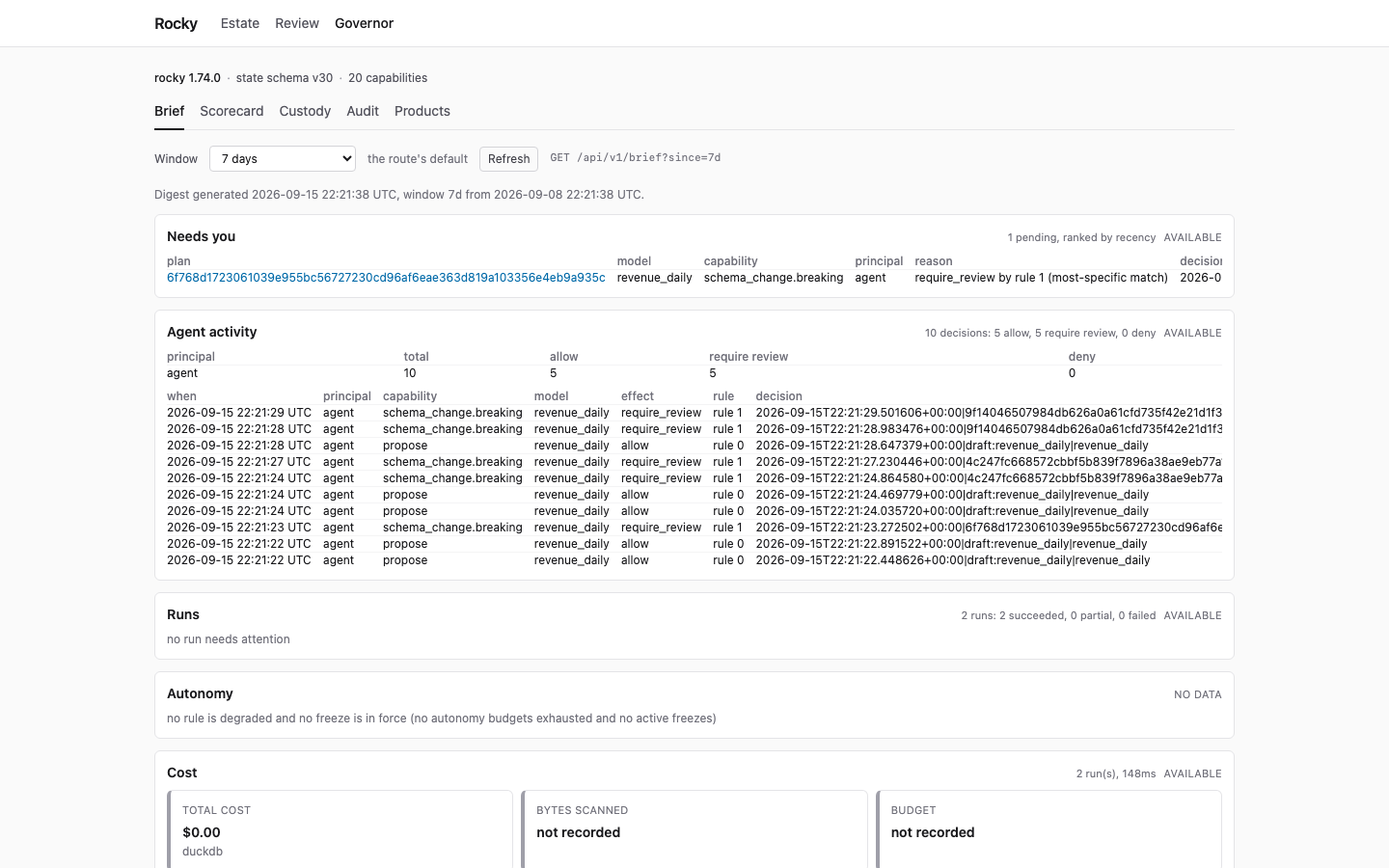
A card says so when its data was not available. A signal the ledger does not hold shows as not recorded, never as a zero. In the summary line, a part with nothing in the window says so in its own words, such as “no runs in the window”. A part the engine could not read says not recorded, never zero.
Estate
Section titled “Estate”The printed address opens Estate, even though Needs you is first in the sidebar. It shows the project as the engine compiled it. The strip at the top names the config file, the pipelines and adapters, the compiled models with their diagnostics, and the newest run.
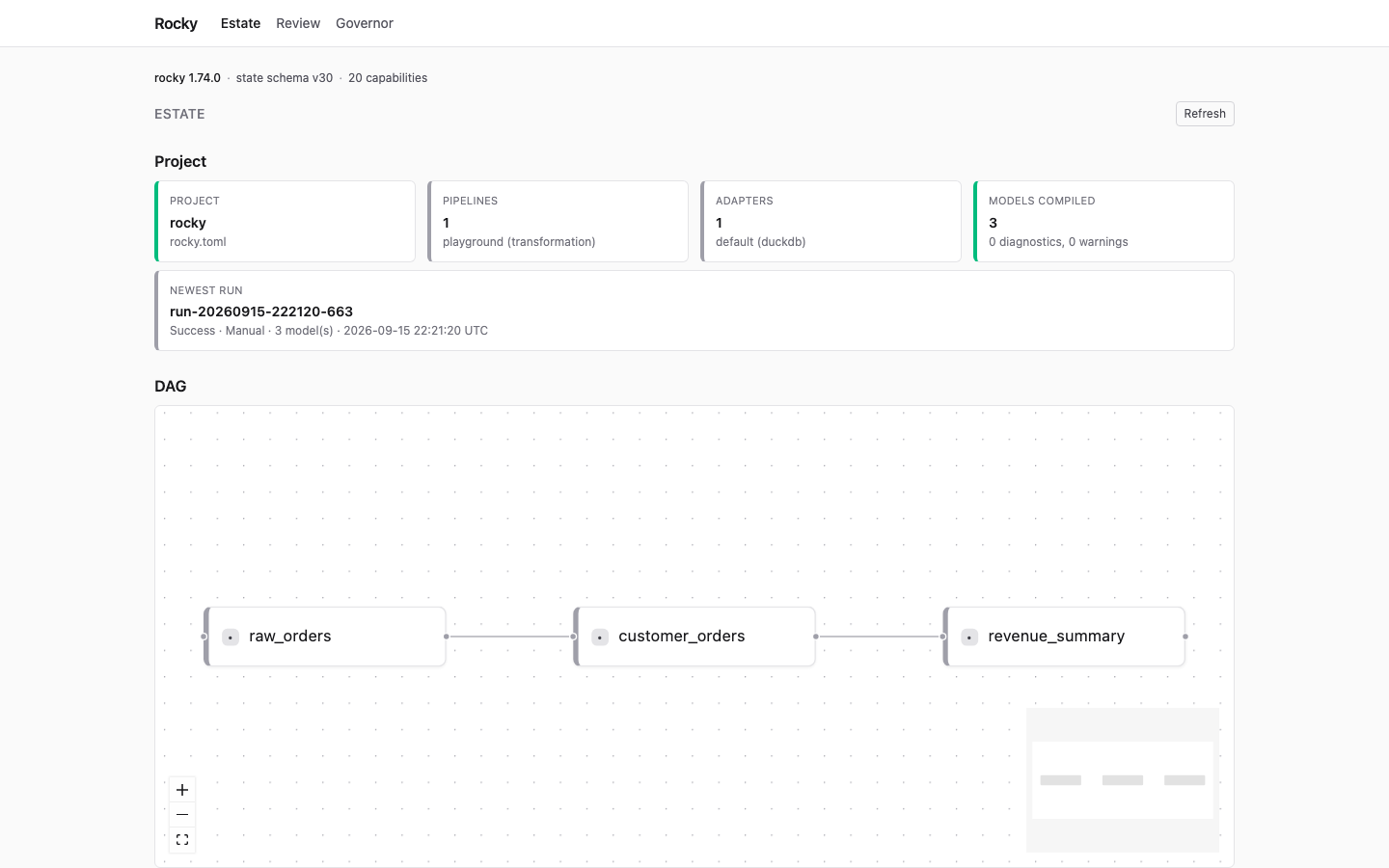
Below the project strip, the DAG draws every model and the edges between them. Click a model to open its detail: its columns (with their types, where the compiler inferred them) and its compiled SQL. The server caps the SQL at 256 KiB and says so when it cuts it. Further down, the estate lists recent runs and the pipelines that declare a [schedule]. The Schedule panel also shows the webhook demands waiting in the spool, which no tick has claimed yet. If the server cannot read the spool, the panel shows that error instead of a count.
Review
Section titled “Review”The Review screen lists the plans that the policy plane sent to a human, by a rule or by the default effect. The engine ranks the queue by a score: blast radius × change class × staleness. A breaking schema change weighs 3, a bare apply, promote or backfill weighs 2, and anything else weighs 1. So a wide-reaching breaking change that has waited long comes first. It is the same list rocky review --queue prints.
Open a plan to see why it waits:
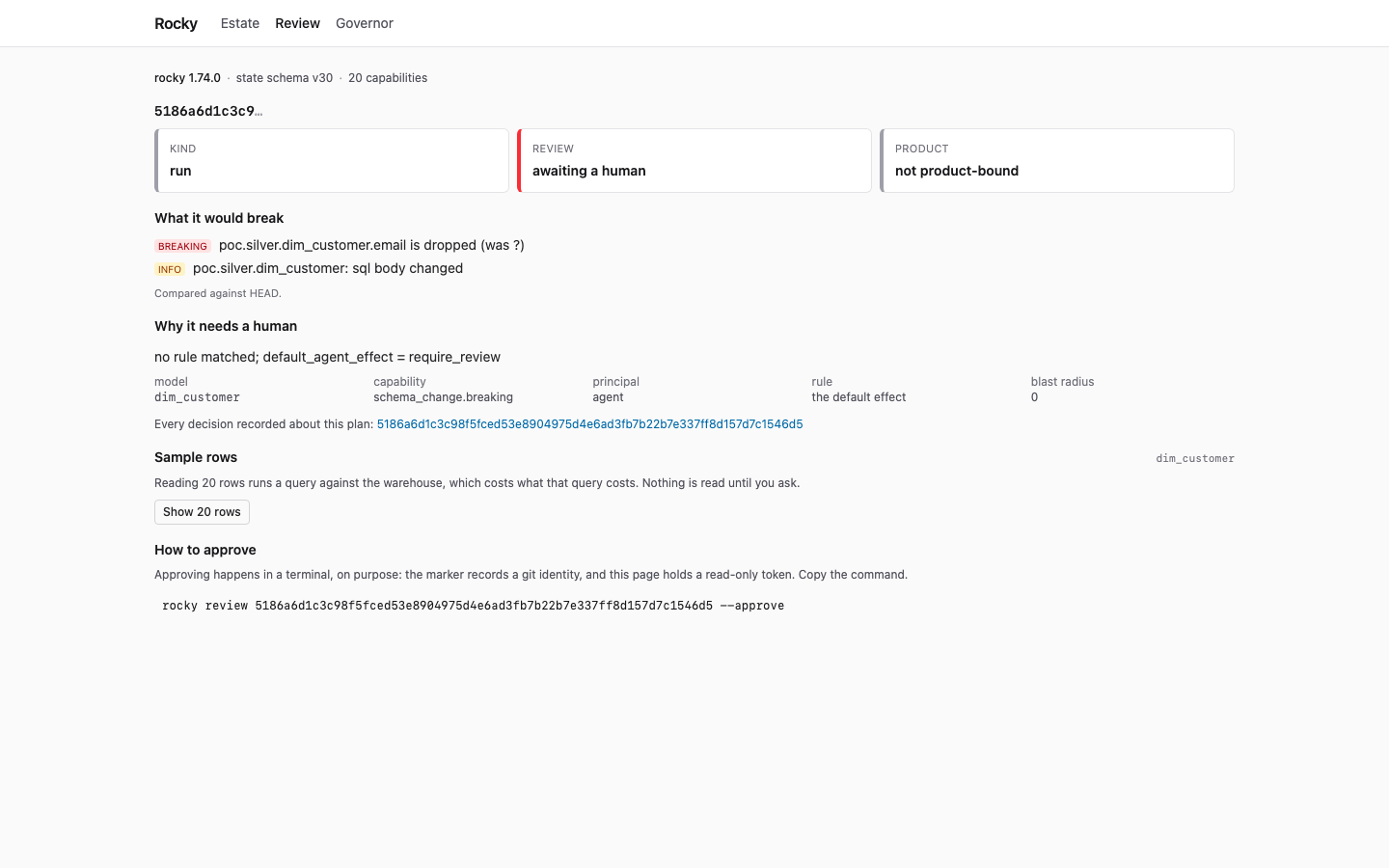
The plan screen shows:
-
What it would break. The breaking-change findings against
HEAD, or why that check could not run. -
Why it needs a human. The rule, the capability, the principal and the blast radius behind the
require_reviewdecision. -
The spec it was planned against. For a product plan only: whether the product spec changed after the plan was made.
-
Sample rows. Nothing is read until you ask. The button runs the model’s query against the warehouse for up to 20 rows, and that query has a cost. The engine masks each classified column before the rows leave it, and refuses the whole sample rather than return a classified column it cannot mask. The refusal names every column and tag, and both ways out.
The workspace
[mask]block decides first. A strategy masks the column, andnonereturns it raw, which is an operator’s decision rather than a gap.[classifications.allow_unmasked]is only the fallback for a tag that block does not answer: a tag with a strategy is masked even when the list names it.What is left is refused: a tag with no
[mask]entry that the list does not name, and a tag answered only under[mask.<env>], which this path does not read.The button appears only when the plan names exactly one model to sample.
-
Approval. A panel beside the evidence, or under it on a narrow screen. It shows three steps: Proposed, Approved and Applied. Then the Approve and Apply buttons, and the command to copy.
In operator mode, the plan screen can approve and apply the plan. With a read-only token, the buttons are disabled and say why. You can always approve in a terminal:
rocky review <plan-id> --approveAn approval records a row in the policy-decision ledger before it writes the review marker. An approval from this page records the channel http_api and an unnamed principal. The approve job drops the server’s ROCKY_PRINCIPAL_ID and ROCKY_PRINCIPAL, because they name the operator who started the server, not you. See rocky review.
A plan bound to a data product shows a Spec digest you approved box instead. It is always empty when the page opens, and the page never fills it in from the plan, the product status or any other response. Type the digest of the spec you approved. Apply stays off until the plan is approved and the box holds a digest. The page then asks you to confirm, and repeats the digest you typed. It sends exactly that digest (without any spaces around it). The engine compares it with the digest the plan carries and refuses the apply if they differ. A refused apply shows the engine’s last Error: lines, with paths and secrets removed. The engine’s mismatch message names both digests. The plan’s digest is not a secret. The check only works when the digest you type comes from the approval: it is approval.spec_digest in rocky product status <name>. Do not copy the plan’s own digest from the spec card, because then the plan is compared with itself. The same apply works in a terminal:
rocky apply <plan-id> --expect-spec-digest <the spec digest you approved>The plan status records approval, not apply. So the Applied step shows as done only after an apply from this page succeeds. Otherwise, once the plan is approved, Applied shows as not known. The page cannot tell an applied plan from one that waits. The run itself is on Estate.
Apply runs the models as they are on disk, not SQL stored in the plan. So it checks the plan’s models before it runs them. If a model was added, removed or edited after the plan was made, apply refuses with plan_models_changed: “models changed since this plan was made; plan again”. Plan again, review the new plan, and apply that. A person’s apply compares the models only, so a different environment or an edit to another pipeline does not refuse it. Approving compares the models only too, so a plan made in a shell can be approved here. It also means a config edit made after approval is not caught. The models can still change between this check and the run’s own compile. An agent’s apply is checked again inside the run. A plan whose models did not compile at plan time has no fingerprint and is not checked. A plan made before this check refuses with plan_snapshot_missing; plan again.
Products
Section titled “Products”Products shows each data product: its fulfillment loop state, its working spec digest, whether its approval is recorded, and its journal. The journal lists every event the engine recorded for the product, in order.
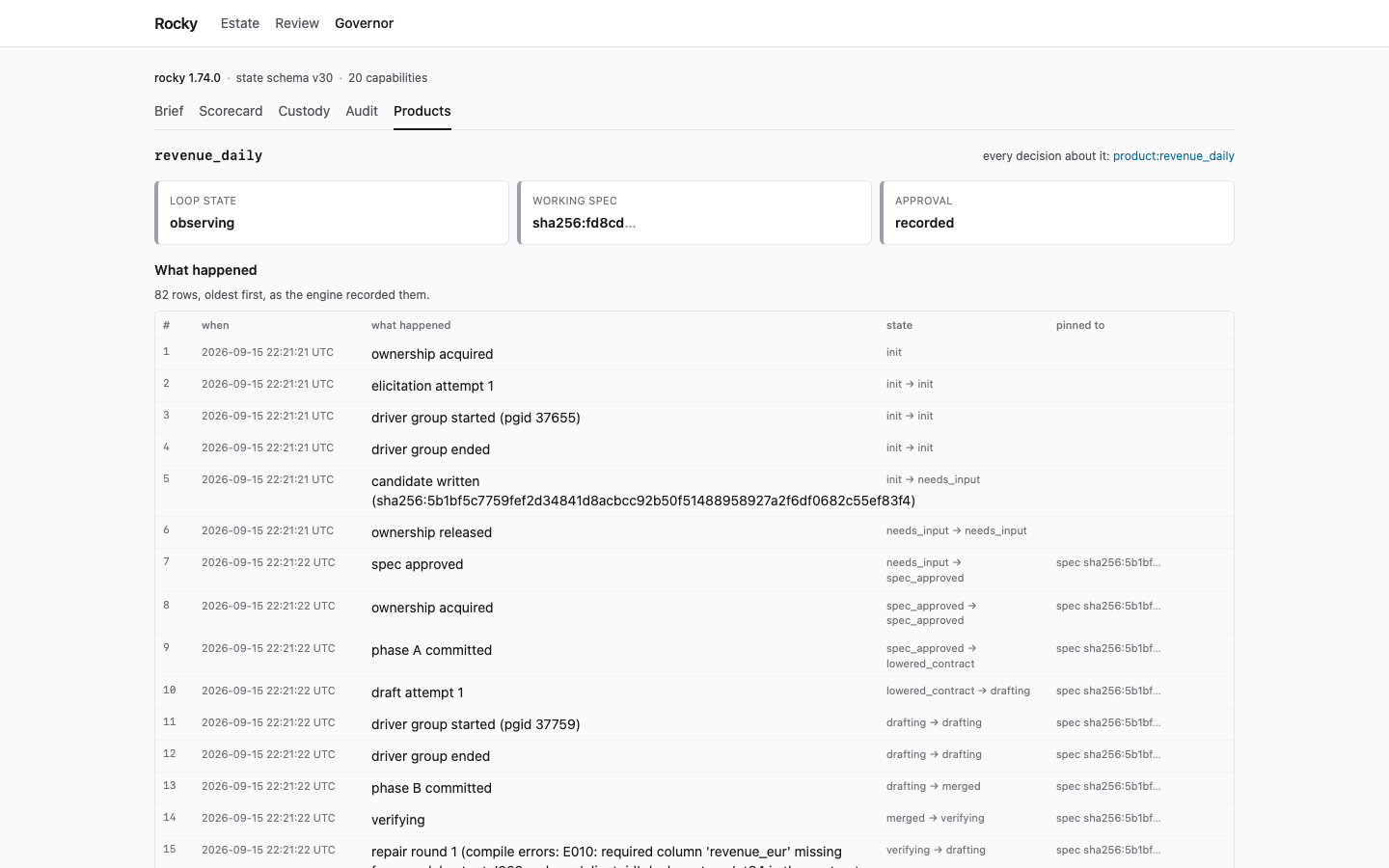
In operator mode, a product whose spec has no approval, or whose working spec differs from the approved one, shows an Approve the spec section. See Approve a product spec.
Governance
Section titled “Governance”Governance answers “what did the agents do, and was it allowed?” It is the one area with tabs of its own: Scorecard, Custody and Audit.
Scorecard
Section titled “Scorecard”The scorecard shows acceptance, review and denial rates for a window you pick. Group them by principal, by rule, or by the model decided on. It matches rocky audit --scorecard. It lists the metrics the ledger cannot support, and gives the reason for each.
Custody
Section titled “Custody”Enter a subject to trace its chain of custody. A subject is a model, a run id, a plan id, or another id the ledger records, such as freeze:global. It shows the decisions about it, the plan, the runs that applied it, any verification after apply, and its blast radius. It matches rocky audit --for <subject>.
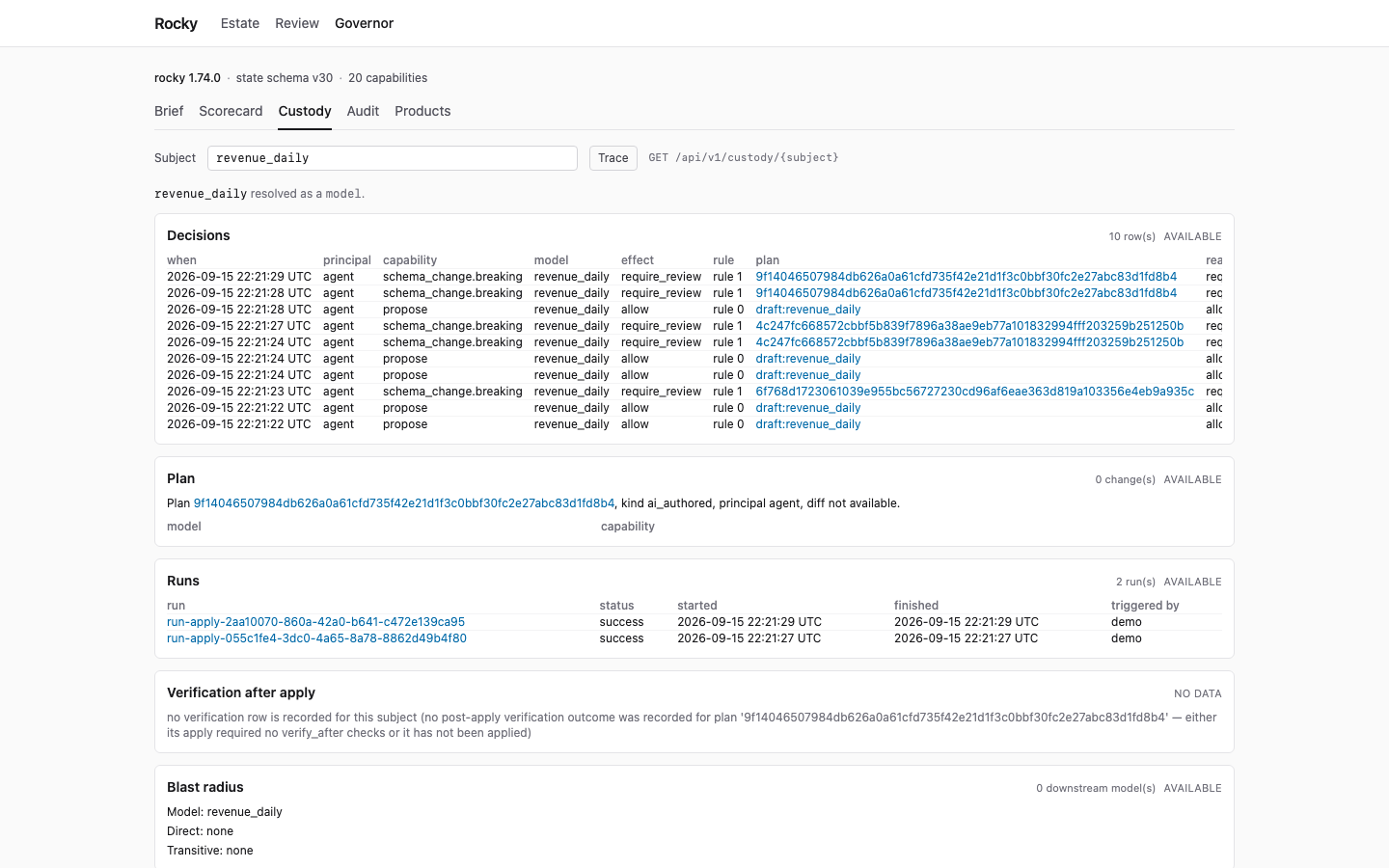
The audit tab is the whole policy decision ledger, oldest first. Filter it to one product. It matches rocky audit and rocky audit --product <name>.
Areas without a screen
Section titled “Areas without a screen”Six of the eleven areas open nothing today. The sidebar folds them under Coming later, so the five areas that work come first. Open it to see each name with the reason under it, as plain text. A reason says where the same information is now, when it is somewhere. The reasons stay hidden until you open the fold:
| Area | What the sidebar says |
|---|---|
| Projects | One project for now: the one this server runs. |
| Runs | No page of its own yet. The runs table is on Estate. |
| Scheduler | No page of its own yet. The schedule status is on Estate. |
| Policies | No page yet. The engine serves the rules at /api/v1/policy. |
| Agents & Clusters | No page yet. Agent activity is on Needs you. |
| Settings | No page yet. The engine serves them at /api/v1/settings. |
A route with no page is not the same as nothing at all. The two API routes named above answer today, and the Embedding guide covers them.
Operator mode
Section titled “Operator mode”Operator mode lets the page make changes: run, plan, test, run CI, approve and apply, freeze and unfreeze policy, create a preview, promote a branch (only when the project requires a branch approval), approve a product’s spec, plan and apply a compaction, and cancel a running job. They run as the OS user who started the server, like the VS Code extension. It is on when the token has full scope. The page then shows Operator mode — changes run as this server’s user at all times. With a read-only token, the page shows the write controls disabled. The label at the top gives the reason once, and each button’s tooltip repeats it. While a job runs, its button is disabled and says running…. A failed job shows its errors, or the final Error: lines, never the server’s log lines.
Freeze and unfreeze
Section titled “Freeze and unfreeze”The Needs you screen has a Freeze form below the autonomy section. Pick a principal (agent, human or both) and a scope (any, layer=<n>, model=<glob>, classification=<v> or tag=<key>[=<value>]), and add a reason if you want one. The page asks you to confirm before it freezes. Each freeze in force has an Unfreeze button that asks the same way and lifts that freeze’s principal and scope. One kind of row is the exception. A durable freeze marker whose body cannot be read is in force for both principals on every model. It is listed once, as unreadable marker, and its Unfreeze sends no principal and scope any, the only form rocky policy unfreeze accepts for it. It lifts every unreadable marker and every freeze on scope any, for both agent and human. The confirm text says so.
The buttons run rocky policy freeze and rocky policy unfreeze on the server. A result can succeed and still need your attention, so the page shows the result’s notes under the button. A freeze with no [policy] block in rocky.toml is recorded but enforced nowhere, and the page shows it as a warning, not as done.
Freeze and unfreeze take the same single write slot as a run. Both open the local state store, even on a remote [state] backend, and a run holds that store for its whole run. So a browser freeze is refused while a run, apply or approve is in progress: it answers 409 mutation_in_progress until that job finishes, and you retry then. To stop a running run, use Cancel on that job. A run this server did not start, such as one from a terminal or an orchestrator, also holds the local store but not the server’s slot. A freeze then fails on the store lock; on a remote [state] backend with durable markers, its marker is already written and the run stops at its next fence, but a retry writes a second marker. Retry after that run ends.
The ledger row names the server’s principal id, not the person at the page. The server reads it from ROCKY_PRINCIPAL_ID in its own environment, else unnamed. A --principal-id flag on rocky serve does not reach these jobs. The row does not record that the freeze came from the browser.
Create a preview
Section titled “Create a preview”The Estate screen has a Preview panel. Give a branch name (optional) and a base ref (optional, default main). The page asks you to confirm, then runs rocky preview create on the server. The name takes letters, digits and underscores, up to 64. With no name, the server derives one from the current branch of the git checkout it runs in, so every click from the same checkout gives the same name. After the first click that name is in use, so give a name each time. A name already in use fails the job, so pick another.
The command registers the branch in the local state store file on the server. It does not upload that file to a remote [state] backend. The record names the server’s OS user as its creator, not the person at the page. The command then copies each unchanged model from its production schema into the warehouse schema branch__<name>, using the warehouse credentials in rocky.toml. Production tables are only read. Depending on the warehouse, each copy is a metadata-only clone or a full copy of the table, which costs compute and storage. The confirm text says this before you start.
The command does not re-run the changed models. The page lists them as “planned but not re-run”. A copy that fails for one model does not fail the job, so the page shows a warning that names the model, not a plain “done”. A model the command planned but did not copy shows as “planned but not copied”, and the server log says why. A preview with no changed models copies nothing, and the page shows a warning for that too. If the job fails after it registered the branch, for example when the warehouse cannot be reached, the branch stays registered. A retry needs a new name. The page shows only model names, the schema name and fixed words from the result. It never shows warehouse error text.
Preview create opens the state store for write, so it takes the same single write slot as a run. It answers 409 mutation_in_progress while a run, apply, approve, freeze or unfreeze is in progress. It finds the changed models with git diff between the base ref and HEAD. The project folder must be inside a git repository, and it may be a subfolder of it. The paths git reports are resolved against the repository root, so a project in a subfolder works, with a relative or an absolute --models.
Promote a branch
Section titled “Promote a branch”The Estate screen has a Promote panel. Promote replaces production tables with the contents of a branch, so the page offers it only when rocky.toml sets [branch.approval] required = true. The server reads that key on every request and shows it as branch_approval_required in GET /api/v1/project. With the key off, or when the config cannot be read, the panel shows one line instead. The line says why the control is absent and names the key.
The key makes the engine ask for a signed branch approval before it plans a promote. The page does not sign that approval. Sign it in a terminal, from the project folder:
rocky branch approve <branch>Promote then takes two steps, so you see what changes before it changes.
Plan promote ──▶ plan written, tables listed ──▶ Promote (confirm) ──▶ production tables replaced (checks the approval nothing in production applies that exact plan, and breaking changes) has changed yet it is not planned again- Pick a branch and press Plan promote. The server runs
rocky plan promote <branch>. It checks the signed approval and the breaking changes, writes a promote plan, and replaces nothing. The page lists every production table the plan would replace. A refused plan shows the engine’s lastError:lines, for example that no valid approval was found. - Press Promote. The confirm text names every production table that will be replaced. After you confirm, the page applies the plan by its id, through the same apply as the Review screen. It does not plan again. Apply writes the warehouse with the server’s credentials, and Rocky cannot undo it. The result lists each table as replaced or not replaced.
The server enforces the same rule, so a call that skips the page is checked too. POST /api/v1/jobs/promote and an apply of a promote plan answer 409 branch_approval_not_required unless the config sets required = true. An apply of a promote plan that was built without the approval gate answers 409 promote_plan_not_approved. That covers a plan built while required was off, a plan built with the gate bypassed, and a plan that holds fewer approvals than min_approvers. The promote job runs without ROCKY_BRANCH_APPROVAL_SKIP, whatever the server’s environment holds.
The plan screen mirrors the key. For a promote plan it shows Apply disabled, with the reason and the terminal command, unless the project requires a branch approval. The server stays the authority and also checks the plan’s approvals.
The page has no Approve button for a branch. A browser click would record the approval as local, although it came over the network, and one session could then approve and promote its own branch.
Approve a product spec
Section titled “Approve a product spec”A product’s page on the Products screen shows Approve spec when the working spec has no approval yet, or differs from the approved one. The page asks you to confirm. The question names the product, the spec digest the page read and the output model. It also names the approval it replaces, when there is one. After you confirm, the server runs rocky product approve <name> --expect-digest <digest>, with the digest the page showed in the question.
The approval covers exactly that spec. If the spec on disk changed after the page read it, the command refuses with approval-digest-mismatch, names both digests, and writes nothing. Read the spec again and approve the digest you mean. The result also says when the spec was already approved and nothing was written. The engine refuses a new spec revision while fulfillment work is in flight. The page shows that refusal.
The approver is recorded with its channel, as rocky review --approve records it. The approval stores <server git email> (http_api). A terminal approval stores the bare email, as before. The label names the channel and the server’s git identity. It does not prove who was at the page, and nothing proves that a browser made the call. If the server cannot read git config user.email, or it is literally unknown, the job fails with approver_identity_unresolved. Nothing is written in that case: the snapshot file is not created either.
The job takes the same single write slot as a run. It answers 409 mutation_in_progress while a run, apply, approve, freeze, unfreeze, preview or another product approval is in progress.
Compact tables
Section titled “Compact tables”The Estate screen has a Compact panel. Compact runs OPTIMIZE (it rewrites small files) and VACUUM (it removes stale data files) on Delta tables. It works on Databricks only. It takes two steps, so you see what runs before it runs.
- Choose One table and type its full name,
catalog.schema.table, or choose Every managed table in a catalog and type the catalog. Press Plan compact. The server runsrocky compact <table>orrocky compact --catalog <name>. The command writes a plan file and runs no statement. For a replication pipeline, a catalog plan asks the source adapter to discover tables. The page shows the number of statements, the table count, the target file size and every table. The statements are under The statements. If the command could not save the plan, the page says so and offers no apply. - Press Compact. The confirm text names every table. After you confirm, the page applies the plan by its id, through the same apply as the Review screen. It does not plan again, so what runs is the plan you saw. Apply uses this server’s warehouse credentials, and Rocky cannot undo it.
The page never passes --dry-run. The command’s --dry-run prints “no statements executed”, but it still writes a plan that apply can run. The plan step is the preview.
The plan step takes no write slot. The apply takes the same single write slot as a run, and answers 409 mutation_in_progress while another job holds it. Archive is different: it deletes rows and then vacuums with no retention window. The Compact panel has no archive option, the plan screen shows no Apply button for an archive plan, and the server answers 409 archive_apply_terminal_only to POST /api/v1/jobs/apply for one.
Cancel a running job
Section titled “Cancel a running job”While a job runs, operator mode shows a Cancel button under it. A read-only page does not show it. The button calls POST /api/v1/jobs/{id}/cancel:
Cancel ─▶ SIGTERM to the job's process group (handled like Ctrl-C) ─▶ the button becomes "Force stop"Force stop ─▶ SIGKILL to the job's process group ─▶ the job stops at onceThe engine answers only once the signal reached the job. The job then ends cancelled. If it exits 0 anyway, it ends succeeded. A job that exited before the signal reached it answers 409 job_not_running. A cancelled run, apply or approve keeps the project’s single write slot until its process has exited, so a new one waits for it (409 mutation_in_progress).
What a cancelled job leaves:
- A run or apply of a replication pipeline, after Cancel, stops like Ctrl-C in a terminal. It starts no new table copies and lets the copies in flight finish. It saves their watermarks, marks the other tables
Interrupted, and exits130. Run history shows it as a partial failure.rocky run --resume-latestcopies the rest. - Any other job, after Cancel (models, a plan, an approval), stops at once. Rocky has no clean-stop step for these yet (#1606). A warehouse statement in flight is cut, and the warehouse keeps or drops it whole. A state write in flight is all or nothing. Models that finished stay built. Run the job again to finish.
- After Force stop, any job stops like a crash. An incremental replication table can have its rows landed before its watermark was saved. On DuckDB, Databricks, Snowflake and BigQuery, the next run of that table reads the watermark back from the target table first, so it does not copy the same rows twice. On other warehouses, prefer Cancel.
A plan file cut part-way no longer reads as its plan id, so Rocky refuses to apply it.
Cancel reaches only jobs this server process started. A scheduled run (--scheduler) answers 409 job_not_cancellable, and a finished job answers 409 job_not_running. On Windows there is no SIGTERM, so Cancel kills the job at once. Stopping rocky serve with Ctrl-C or SIGTERM sends each of its running jobs the same SIGTERM as Cancel, and waits up to 5 seconds for it to be sent.
rocky serve --ui turns it on by itself when all of these hold:
- The bind is loopback (
127.0.0.1,::1orlocalhost). - You gave no token.
- You gave neither
--allowed-hostnor--allowed-origin.
The server then prints one note on stderr. It says the UI can make changes as the server’s user, and to use --read-only for a view-only UI.
rocky serve --ui --read-only # view-only UIKnow these limits:
- The printed link is a write credential. In operator mode the
/login?t=link carries a full-scope token. Anything that captures the server’s stdout holds it:docker logs, CI logs, terminal scrollback, a log shipper. So does browser history. Use--read-onlywherever the output is captured or shared. - A server behind a proxy is shared. With
--allowed-hostor--allowed-origin, the server stays read-only. It generates a read-only token. It refuses--token-scope full. Writes from the UI need a token for each person. - A tunnel looks local. An SSH
-Ltunnel orkubectl port-forwardto a loopback port cannot be detected. The server still looks local. Use--read-onlywhenever someone else can reach your port. - A local proxy can look local too. A reverse proxy on the same machine (nginx, Caddy) that forwards with
Host: 127.0.0.1passes the host check with no--allowed-host, so the server stays in operator mode. Start it with--read-only, or name the proxy host with--allowed-host, which makes the server read-only. --openshows the token. It puts the address, token included, in the opener’s command line. At full scope, another local OS user who reads the process list could act with it. On a shared machine, pass--tokenand use--read-only.- The link stays in browser history. The
/login?t=link, token included, is kept in history and may sync to your other devices. It works until the server stops. Restart the server to end it. - Other local pages get the cookie. Browsers do not separate cookies by port, so a page from another server on this machine receives the session cookie. That server’s owner could replay it. The cookie cannot write from such a page, because a write needs this server’s exact origin and
X-Rocky-UI: 1. Each server uses its own cookie name, so tworocky serve --uion one machine do not end each other’s sessions. - One token does everything. It can plan, approve and apply, as the CLI user can. Approving in the UI is not a second person’s sign-off.
- The webhook route has its own secret.
/api/v1/hooks/trigger/{pipeline}checks an HMAC signature. It is the one write route outside the Bearer token.
An approval from the UI records the approver source http_api and the server’s git identity. If the server cannot resolve git config user.email, or it is literally unknown, the approve job fails with approver_identity_unresolved. Run records from HTTP jobs show the session source http_api. That names the HTTP API as the source. It does not prove a browser made the call.
What the UI cannot do
Section titled “What the UI cannot do”- With a read-only token, it cannot write. A read-only token gets
403 forbidden_read_only_tokenonPOST /api/v1/jobs/runand every other token-checked write. - It cannot apply an archive plan. Archive deletes rows and then vacuums with no retention window, so it cannot be undone. The plan screen shows no Apply button for an archive plan, and the server answers
409 archive_apply_terminal_onlytoPOST /api/v1/jobs/applyfor one. Apply it in a terminal withrocky apply <plan-id>. - It cannot archive.
rocky archivestays in a terminal. The Compact panel does not offer it, and the server refuses to apply an archive plan (see above). - It cannot sign a branch approval. Sign it in a terminal with
rocky branch approve <branch>. - It cannot know the spec digest for you. A product-bound plan applies only with a digest you type, and the digest must come from the approval. The page never reads it from the plan.
- It cannot change policy. The Governance screens report decisions, and
/api/v1/policyreads the rules back. The rules themselves live in the[policy]block ofrocky.toml, androcky policy freezeandrocky policy unfreezeare the CLI’s only policy writes.
How the server protects the page
Section titled “How the server protects the page”With --ui, the server adds checks that a plain rocky serve does not run:
- On a host that is not loopback,
--uirefuses to start without a token, and refuses a full-scope token. On a loopback host with no token, it generates a per-process token: full scope, or read-only when--read-onlyor--allowed-host/--allowed-originis set. A loopback server with--allowed-hostor--allowed-originrefuses a full-scope token. - A request whose
Hostis not a loopback name, the bind host, or an--allowed-hostentry gets421 host_not_allowed. This defends against DNS rebinding, where an attacker’s domain is made to resolve to127.0.0.1. The check also runs on a loopbackrocky servewithout--ui.GET /api/v1/healthskips this check, so a load balancer probe still works. - A request whose
Originis neither the server’s own nor an--allowed-originentry gets403 origin_not_allowed. The check reads the origin’s host, not the whole origin, so anhttporhttpsorigin on an allowed host passes whatever its port. On a loopback server that includeshttp://localhost:5173, a local dev server.GET /api/v1/healthskips this check too. - Every UI file response carries a Content Security Policy. The page loads scripts and fonts from this server only, and styles from this server or inline. Nothing may frame it.
--ui --schedulerrefuses to start withoutROCKY_WEBHOOK_SECRET, because a browser can reach the webhook route.
Behind a reverse proxy, name the proxy host with --allowed-host:
rocky serve --ui --host 0.0.0.0 --token "$TOKEN" --read-only \ --allowed-host rocky.internalThe rocky serve reference lists every flag. The Embedding guide covers the HTTP API behind the page.